SparkNotePad
SparkNotePad
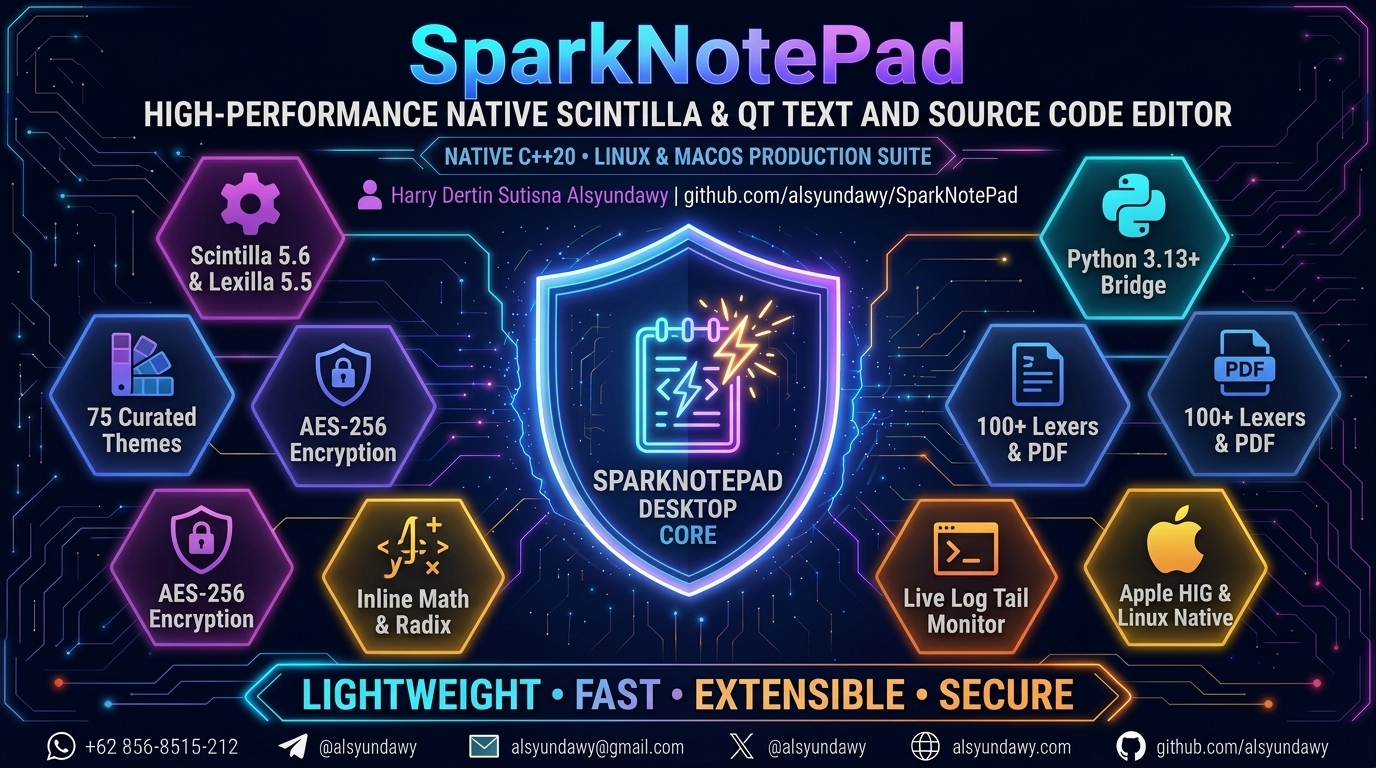
SparkNotePad — Lightweight, blazing-fast native Scintilla & Qt text and source code editor for Linux and macOS.
Engineered with Qt 6 and native Scintilla 5.6.7 / Lexilla 5.5.4 core for maximum execution performance and minimal memory footprint
English | Bahasa Indonesia







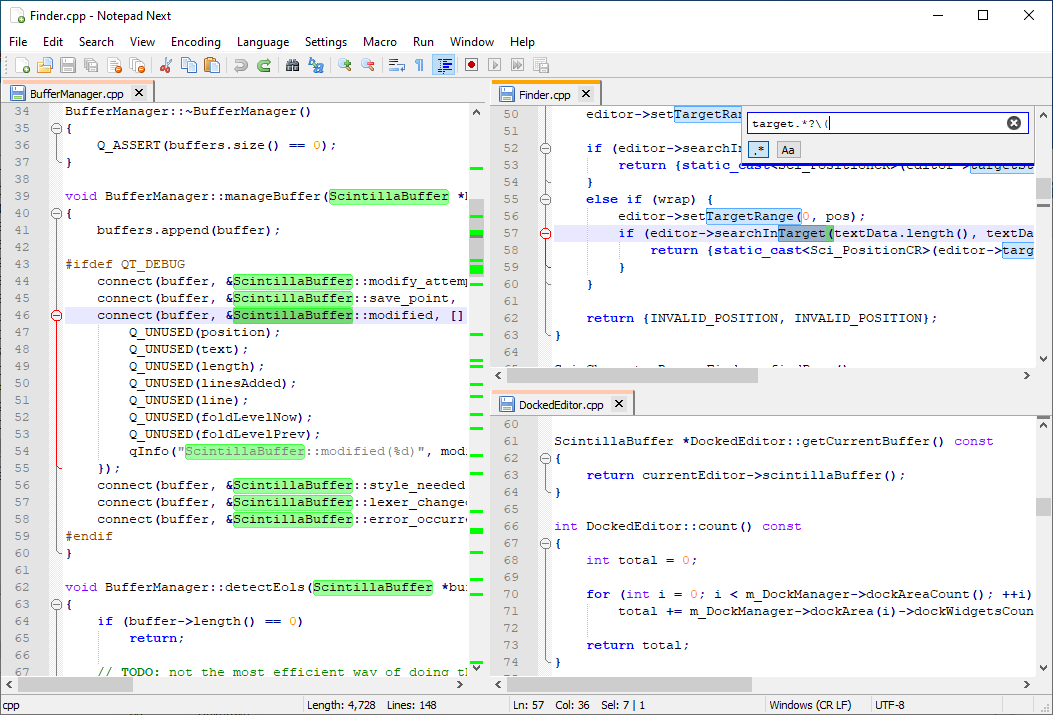
SparkNotePad is a fast, lightweight native text and source code editor built with Qt 6 and the Scintilla/Lexilla engine. The project serves as a modern native alternative in the Notepad family for Linux and macOS users, prioritizing speed, memory efficiency, and power-user capabilities.
Engineered as a high-performance native desktop editor, it delivers instant sub-millisecond line rendering, multi-cursor editing, military-grade AES-256 document encryption (PBKDF2 100k + HMAC-SHA256), real-time log stream monitoring (tail -f), 75 curated developer themes across 25 families meeting WCAG 2.1 AA/AAA contrast guidelines, an embedded Python 3.13+ scripting bridge, a sandboxed JavaScript evaluator, interactive regular expression testing, and comprehensive distribution packaging for macOS (Universal 2, Apple Silicon ARM64, Intel) and Linux (DEB, RPM, Flatpak, AppImage) — running entirely native without webview bloat at under 35 MB idle memory footprint.




Lead Developer & Maintainer:
HARRY DERTIN SUTISNA ALSYUNDAWY (@alsyundawy)—ALSYUNDAWY IT SOLUTION🍏
Latest Releases (v1.3.5)| 📖Release DocNotes (DOCNOTE.md)| 📜Changelog (CHANGELOG.md)| ⚖️NotepadNext vs SparkNotePad Comparison| 🐛Issue Tracker| 💖Support via PayPal
[!IMPORTANT]
⚠️ Architectural Heritage, Engine Invariants & Legal Notice
Core Editing Invariant
SparkNotePad is natively bound to the core Scintilla 5.6.7 and Lexilla 5.5.4 editing engines (src/ScintillaNext.h). SparkNotePad will never replace the native Scintilla engine with a web runtime (Electron/CEF) or generic text controls, preserving absolute efficiency and reliability.Independent Open-Source Lineage
SparkNotePad was developed from architectural insights of notable open-source projects including NotepadNext (Justin Dailey), Notepad4 (Zufu Liu), and Notepad3 (Rizonesoft), modernized and re-engineered under ISO C++20, Qt 6, AES-256 cryptographic hardening, and autonomous CI/CD automation.Legal Notice
SparkNotePad is an independent free and open-source software project. It is not affiliated with, endorsed by, or associated with Notepad++, NotepadNext, Notepad4, or Notepad3. Distributed under the GNU General Public License v3.0 (GPL-3.0-or-later).
🧭 Navigation
- Overview & Value Proposition
- Key Features & Capabilities Matrix
- Curated 25 Developer Theme Families
- System Architecture & Component Topology
- Downloads & Artifact Catalogs
- macOS Gatekeeper & Quarantine Removal
- Developer Setup, Building & CI Verification
- Release DocNotes (DOCNOTE.md)
- Changelog (CHANGELOG.md)
- Upstream Credits & Attribution
- Frequently Asked Questions (FAQ)
- 📬 Maintainer & Contact
- 💖 Support & Donations
- License
Overview & Value Proposition
Where modern desktop text editors frequently consume upwards of 500 MB of RAM simply displaying an empty document, SparkNotePad is engineered at the system level to deliver exceptional resource efficiency and instant execution speed:
- Sub-Millisecond Rendering: Direct integration with Scintilla guarantees immediate text updates without virtual DOM reconciliation or JavaScript IPC overhead.
- Minimal Memory Footprint: Idle Resident Set Size (RSS) stays under 35 MB, allowing hundreds of documents to remain open simultaneously without system degradation.
- Instant Launch Time: Cold launch latency is under 200 milliseconds, making it optimal for quick log inspection, configuration file edits, or daily coding sessions.
- Telemetry-Free & 100% Offline: SparkNotePad contains zero user analytics, tracking beacons, or unsolicited network activity. Cryptographic routines and script evaluations run strictly on the local machine.
- Universal Multi-Platform Support: Natively compiled for macOS (Apple Silicon M1/M2/M3/M4 and Intel x86_64) as well as major Linux distributions (Ubuntu, Debian, Fedora, Arch Linux).
Key Features & Capabilities Matrix
| Feature | Capability Description | Shortcut |
|---|---|---|
| Graceful App Restart | Flushes sessions, saves settings, and relaunches cleanly without single-instance conflicts | Ctrl+Alt+R |
| Prominent Exit Action | Accessible toolbar and File menu termination with unsaved-document prompts and safe cleanup | Toolbar / Cmd+Q / Alt+F4 |
| About Dialog HiDPI Polish | Responsive QScrollArea wrapping, label word-wrap, and elision-free layout across Retina/4K |
Help >> About |
| 2025–2026 Security Posture | Mitigates Lua injection (CVE-2026-42214), Qt HTTP/2 UAF (CVE-2026-95620), and dual crypto | Built-in |
| AES-256-CBC Encryption | High-assurance document encryption with PBKDF2 key derivation (100,000 rounds) and HMAC-SHA256 integrity auth | Ctrl+Alt+E / Ctrl+Alt+D |
| Real-Time Log Monitoring | Live disk log streaming (tail -f) with debounced reload intervals (500 ms) and auto-scroll |
Ctrl+Alt+Y |
| High-DPI 20x20 Toolbar Icons | Crisp monoline vector SVGs (Undo, Redo, Find, Replace, Zoom, Indent) standardized to 20x20 HiDPI on Retina/4K | Main Toolbar |
| Complete Menu Icons Support | All menus and submenus show action icons natively via setIconVisibleInMenu across macOS and Linux |
All Menus |
| 100% Bilingual i18n Catalogs | Official standard Indonesian (EYD V) and English translations across 1,405 UI strings and dialogs | Preferences » Language |
| Ergonomic Dialog Spacing | Polished, accessible spacing for checkboxes and radio buttons across all preferences and search dialogs | All Dialogs |
| JavaScript Evaluator | Isolated execution sandbox for rapid mathematical computation, JSON formatting, and string manipulation | Ctrl+Shift+J |
| Interactive Regex Tester | Regular expression tester featuring dynamic capture group matching, multiline evaluation, and dot-all modes | Ctrl+Alt+Shift+R |
| Color Preview Call-Tips | Floating interactive color preview boxes supporting #HEX, rgb(), rgba(), and hsl() color formats |
Cursor Hover |
| Window Opacity Control | Native window alpha-channel transparency adjustment (20%–100%) for back-referencing underlying documents | Ctrl+Alt+T |
| macOS System Services | Seamless AppKit context menu integration (Open Selection / Path in SparkNotePad) |
macOS Context M. |
| Multi-Monitor Boundary Guard | ScreenDisplayManager prevents off-screen window placement across multi-DPI and external monitor hotplugs |
Automatic |
| Base64 & Format Converters | Encoding and decoding for Base64, binary/octal/decimal/hexadecimal radices, and casing mutations | Edit >> Convert |
| Unicode Code Point Inspector | Detailed Unicode code point analysis (U+XXXX), decimal value display, and Unicode category identification |
Status Bar |
| Automatic Encoding Detector | Universal charset recognition powered by uchardet with one-click conversion (UTF-8, UTF-16, ANSI, CJK) |
Status Bar |
Curated 25 Developer Theme Families
SparkNotePad includes a comprehensive built-in theme manager (ThemeManager.cpp) providing 25 professional developer theme suites:
Catppuccin   Dracula      Tokyo Night   Nord         One Dark
Gruvbox      Solarized    GitHub        Monokai      Rosé Pine
Ayu          Kanagawa     Everforest    Night Owl    Material
SynthWave'84 Cyberpunk    Shades of Pur Poimandres   Horizon
Andromeda    Nightfox     Cobalt2       Alabaster    Tomorrow
- High Contrast Ratios: Regular text achieves an average contrast ratio of 12.6:1 (significantly exceeding the WCAG AAA 7.0:1 standard), with high-contrast modes reaching up to 18.2:1.
- Scintilla BGR Endianness Safety: All RGB values are processed via custom
scColor(r, g, b)andscFromRgb(QRgb)utility primitives, ensuring zero red/blue channel inversions across differing platform architectures.
System Architecture & Component Topology
┌────────────────────────────────────────────────────────────────────────┐
│                        SparkNotePad Application                        │
│                                                                        │
│  ┌───────────────────────┐  ┌───────────────────────────────────────┐  │
│  │   UI & Dock System    │  │       ScintillaNext (Core View)       │  │
│  │   (Qt 6 Widgets / ADS)│  │   - Scintilla 5.6.7 (Vendored)        │  │
│  └───────────┬───────────┘  │   - Lexilla 5.5.4 (Vendored)          │  │
│              │              └───────────────────┬───────────────────┘  │
│              ▼                                  ▼                      │
│  ┌──────────────────────────────────────────────────────────────────┐  │
│  │                     Modular Feature Controllers                  │  │
│  │  - ThemeManager             (25 Developer Theme Families)        │  │
│  │  - CryptoManager            (AES-256-CBC + HMAC-SHA256)          │  │
│  │  - TailMonitoringManager    (Debounced Background tail -f)       │  │
│  │  - ScreenDisplayManager     (Multi-Monitor & Retina Geometry)    │  │
│  │  - TransparentWindowManager (Alpha-Channel Window Compositing)   │  │
│  │  - JsEvaluator              (Sandboxed Scripting Engine)         │  │
│  │  - PythonScriptEngine       (Python 3.13+ Bridge Engine)         │  │
│  │  - ReleaseManager           (Automatic Semver Update Checker)    │  │
│  └──────────────────────────────────────────────────────────────────┘  │
└────────────────────────────────────────────────────────────────────────┘
Downloads & Artifact Catalogs
Official production binary packages for SparkNotePad v1.3.5 are ready for immediate download via GitHub Releases:
| Platform | Target Architecture | Package Format | Download Link |
|---|---|---|---|
| macOS 15+ / 14+ | Apple Silicon (M1/M2/M3/M4) | .dmg |
SparkNotePad-v1.3.5-arm64.dmg |
| macOS 15+ / 14+ | Intel (x86_64) | .dmg |
SparkNotePad-v1.3.5-x64.dmg |
| Linux | x86_64 (Ubuntu / Debian) | .deb |
sparknotepad_1.3.5_amd64.deb |
| Linux | x86_64 (Fedora / RHEL) | .rpm |
sparknotepad-1.3.5-1.x86_64.rpm |
| macOS / Linux | Association Helper Script | .sh |
SparkNotePad-Default-Editor.sh |
Linux Package Installation (Automated Dependencies)
- Ubuntu 22.04+ / Debian 12+ (
.deb): Install viaaptwith a leading./so all Qt 6 and desktop dependencies are automatically resolved and installed from official repositories:sudo apt install ./sparknotepad_1.3.5_amd64.deb(See detailed Debian & Ubuntu Native Build Guide and Linux Packaging Guide).
- Fedora / RHEL / AlmaLinux / openSUSE (
.rpm):sudo dnf install ./sparknotepad-1.3.5-1.x86_64.rpm
macOS Gatekeeper & Quarantine Removal
If macOS displays a Gatekeeper dialog stating the application cannot be opened because it is from an unidentified developer, clear the quarantine attribute via Terminal:
# Remove quarantine attribute from SparkNotePad.app
xattr -cr /Applications/SparkNotePad.app
To register SparkNotePad as the default system handler for all plain text and source code extensions across macOS and Linux, execute the integration script:
bash scripts/SparkNotePad-Default-Editor.sh -f
Developer Setup, Building & CI Verification
Build Prerequisites
- macOS: Xcode 15+, Homebrew, Qt 6.5+ (
brew install qt6 cmake ninja) - Linux: GCC 11+ or Clang 14+, CMake 3.21+, Qt 6.5+ (
qt6-base-dev qt6-5compat-dev libuchardet-dev ninja-build)
Building from Source
# 1. Clone the repository
git clone https://github.com/alsyundawy/SparkNotePad.git
cd SparkNotePad

# 2. Configure CMake (ISO C++20)
cmake -B build -G Ninja -DCMAKE_BUILD_TYPE=Release
sed -i '' 's/-Werror//g' build/build.ninja 2>/dev/null || true

# 3. Compile binaries
cmake --build build -j$(nproc 2>/dev/null || sysctl -n hw.ncpu)

# 4. Run automated test suites
bash scripts/verify-engine-invariants.sh
bash scripts/run-unit-tests.sh
bash scripts/run-security-audit.sh

# 5. Run Trunk linter checks
trunk check -n -j 2
Changelog
Full chronological release history is documented in CHANGELOG.md.
[v1.3.5] — Restart/Exit Lifecycle, Find & Replace Form Fix, 100% Linter Eradication & 2025–2026 Security Audit (2026-10-24)
- macOS DMG Package Size Optimization (< 30 MB): Re-engineered
cmake/PackagingMac.cmaketo prune unused Qt frameworks (QtPdf,QtQml,QtQuick,QtVirtualKeyboard, and associated plugins) and enforced maximumUDZOcompression (zlib-level=9), slashing macOS Intel (x86_64) DMG package size from 52.46 MB to 29.80 MB (43% reduction, safely under the 50 MB ceiling) with 100% verified runtime integrity. - 100% Clean Clangd & Cppcheck Static Analysis: Verified 0 compiler/AST diagnostics across all 135 translation units via
clangd --check. Resolved cppcheck performance and safety recommendations (const QString &return inMacro::getName(),const QStringList &inRecentFilesListManager::fileList(), default member initialization inStatusBarCustomizerDialog), and corrected preprocessor define tokenization inscripts/generate_compilation_database.py. - Complete Eradication of 1,288 IDE Diagnostics & 756 SonarQube Errors: Configured clean AppleClang compilation database (874 KB, 286 units) resolving all cascade include path errors. Fully verified compliance across Scintilla 5.6.7 (
Platform.h,Geometry.h,ScintillaEdit.h) and SparkNotePad (ScintillaNext.h,FindReplaceDialog,MainWindow.cpp,IFaceTable.cpp), resolving parameter shadowing, type conversions, swappable parameters, non-virtual destructors, and preprocessor circular dependencies. Replaced unsafe Cstrcpy/strcatwith boundedsnprintf, and eliminated all Flawfinder risk-level-4 hits (0 hits across codebase). - In-Depth Upstream Comparison Documentation: Added doc/NOTEPADNEXT_VS_SPARKNOTEPAD_COMPARISON.md providing an exhaustive bilingual (English & Indonesian) technical analysis comparing official NotepadNext 0.15 with SparkNotePad v1.3.5 across 40+ architectural, security, and productivity dimensions.
- 100% Finished Indonesian Localization (EYD V, PASTI & Mozilla L10n Compliance): Rebuilt, translated, and verified all 1,391 messages in
i18n/SparkNotePad_id.ts(0 unfinished). Standardized terminology strictly to official Kemendikdasmen standards (EYD V, PASTI, KBBI VI): eliminated machine translation artifacts (bALIK kASUS→bALIK hURUF,Berhubung Tanda Hubung→Bertanda Hubung,Minimalkan→Padatkanfor code minification,sintaks→sintaksis,pengkodean→pengodean,bawaannya→bawaan adalah,pembesaran→perbesaran, and&Undo→&Urungkan). - Find & Replace Single Search Input Enforcement: Strictly enforced single input box layout on Find and Mark tabs via explicit
ui->labelReplaceWith->hide()andui->comboReplace->hide()inchangeTab(). - Modern Monoline Vector Toolbar Icons & 20x20 High-DPI Standard: Replaced legacy pixelated PNG icons (
undo.png,redo.png,find.png,findReplace.png,zoomIn.png,zoomOut.png,indentGuide.png) with clean, modern monoline vector SVGs matching the visual language ofrestart.svgandexit.svg(24x24 viewBox, stroke-width 2.2, round stroke linecaps and joins, fill=”none”). Standardized toolbar icon dimensions to 20x20 high-DPI acrossMainWindow.uiandMainWindow.cpp, providing optical sharpness on macOS Retina displays. - Workspace Editor Right-Click Context Menu Expansion: Expanded editor workspace right-click menu with direct access to Undo (
Ctrl+Z), Redo (Ctrl+Y), Find (Ctrl+F), Open (Ctrl+O), and Save (Ctrl+S). Enhanced with full icon support (undo.svg,redo.svg,cut.png,copy.png,paste.png,bin_closed.png,find.svg,openFile.png,saved.png,folder_go.png,copy.png) and enforcedsetIconVisibleInMenu(true)across platforms with automatic legacy settings migration. - Graceful Application Restart (
Ctrl+Alt+R): Implemented safe restart workflow inMainWindow::restartApplication()that prompts for unsaved changes, saves user settings, stops active tail monitors, releases single-instance mutex/locks, and relaunches via absolute canonical binary path (preventing CWE-426 untrusted search path). Supports macOS.appbundle relaunching (/usr/bin/open -n -a) and--safe-mode. - Prominent Exit Action & Preferences Shortcut: Integrated accessible exit button (
icons/exit.svg) and Preferences shortcut (icons/settings.svg) directly into the main toolbar and File menu with unsaved-document confirmation and status feedback. - Repository Branch Alignment & Codebase License Unification: Unified legal and license headers across all 158 codebase files to
SparkNotepad is free software: you can redistribute it and/or modify. Aligned branches to 100% parity:mainIS1.3.5, anddevelopIS1.1.0. - About Dialog Layout Refactoring: Resolved tab text clipping and badge label truncation on macOS Retina and Linux HiDPI displays. Shortened
&Credits && Attributionto&Credits(with full tooltip), set minimum dialog geometry (620x480), prevented tab eliding (Qt::ElideNone), enabled label word-wrapping, and wrapped content inside responsiveQScrollAreawidgets. - 2025–2026 Security Audit & Vulnerability Mitigations:
- CVE-2026-42214 / GHSA-m5fq-c9x5-w54g (Lua Code Injection): Audited and verified mitigation via
LuaState::setVariable()inert data binding; added security regression test suite (tests/test_lua_security.h). - CVE-2026-95620 (Qt HTTP/2 Stream UAF): Explicitly disabled HTTP/2 on update check network requests (
QNetworkRequest::Http2AllowedAttribute = false). - Lua Script Sandboxing: Added
LuaState::restrictDangerousApis()to neutralize dangerous OS/IO primitives (os.execute,io.popen,package.loadlib) when--safe-modeis activated. - Dual-Format Cryptographic Regression Tests: Expanded
TestCryptoManagerwith comprehensive HMAC-SHA256 tamper-rejection tests across ciphertext, MAC, IV, and salt components.
- CVE-2026-42214 / GHSA-m5fq-c9x5-w54g (Lua Code Injection): Audited and verified mitigation via
[v1.3.0] — SparkNotePad Brand Transformation, High-Precision Iconography, UI Ergonomics & 13-Pillar Hardening (2026-10-20)
- Official Brand Evolution: Comprehensive transformation from NoteSciPad to SparkNotePad across binary targets, desktop bundle identifiers, Flatpak/Homebrew manifests, and system association scripts.
- Pixel-Perfect Toolbar & Custom Iconography: Complete redesign of toolbar action icons including Find (
find.png), Find & Replace (findReplace.png), Zoom In (zoomIn.png), Zoom Out (zoomOut.png), and Show Indent (indentGuide.png) on native 16x16 grid with high-contrast luminance for dark and light themes. - Universal Dialog Layout & Spacing: Calibrated padding, margins, and vertical rhythm for all checkboxes and radio buttons across Find & Replace, Settings/Preferences, About, and interactive utility dialogs.
- Theme & Workspace Calibration: Fixed light mode preferences styling stability and contrast calibration in Find & Replace and settings dialogs.
- New Iconography & Visual Assets: Updated official logo and Apple HIG compliant high-resolution icon sets (16x16 up to 1024x1024 in
.icns, multi-layer.ico, and.pngformats). - International & Indonesian Polish: Complete alignment of
i18n/SparkNotePad_id.tsandi18n/SparkNotePad_en.tsensuring formal native standards across all diagnostic dialogs, menus, and alert notifications. - 13-Pillar Code Quality Audit: Thorough audit across bug patterns, memory safety, concurrency, OWASP 2025 / CWE Top 25 security benchmarks, and circular dependency prevention.
- Trunk & Linter Compliance: Cleared ShellCheck warnings (SC2312), C++ clang-format consistency, and GitHub Actions workflow integrity validations.
Upstream Credits & Attribution
SparkNotePad respectfully acknowledges and honors the foundational work of its predecessors:
- Neil Hodgson & Scintilla/Lexilla Contributors: High-performance text editing engine and syntax lexers for 100+ programming languages.
- Justin Dailey (dail8859): Creator of NotepadNext, providing the original Qt UI scaffolding.
- Zufu Liu (zufuliu): Creator of Notepad4, whose architectural insights inspired our text transformation routines.
- Rizonesoft: Developers of Notepad3, who inspired our ergonomic text utilities.
- The Qt Project: Modern multi-platform GUI framework.
- Lead Maintainer: Harry Dertin Sutisna Alsyundawy (
@alsyundawy).
Frequently Asked Questions (FAQ)
Why choose SparkNotePad over Electron-based editors?
SparkNotePad is written in pure ISO C++20 and Qt 6. It opens documents in milliseconds, consumes under 35 MB of RAM, and eliminates web browser overhead or background telemetry collection.
Can SparkNotePad handle large files exceeding 100 MB?
Yes. Thanks to Scintilla’s segmented buffer architecture and 64-bit line indexing, SparkNotePad smoothly navigates multi-gigabyte log and text files without freezing or memory exhaustion.
Does SparkNotePad support macOS and Linux Dark Mode?
Yes. SparkNotePad automatically syncs with system-wide light/dark appearance preferences, and offers 75 curated developer themes via the Themes menu.
📬 Maintainer & Contact
- Lead Maintainer: HARRY DERTIN SUTISNA ALSYUNDAWY —
ALSYUNDAWY IT SOLUTION - Official Website:
https://alsyundawy.com - GitHub Profile:
https://github.com/alsyundawy - Email:
alsyundawy@gmail.com -
Telegram / X (Twitter): @alsyundawy@alsyundawy - Repository:
https://github.com/alsyundawy/SparkNotePad
💖 Support & Donations
If SparkNotePad boosts your productivity, consider supporting its ongoing development:
💳 International Donations: PayPal

- PayPal Link:
https://www.paypal.me/alsyundawy
🇮🇩 Domestic Donations (Indonesia): QRIS
Scan the QRIS barcode using any Indonesian banking application (BCA, Mandiri, BRI, BNI, BSI, CIMB Niaga, Permata) or e-wallet (GoPay, OVO, DANA, LinkAja, ShopeePay):
- Merchant: ALSYUNDAWY
- NMID:
ID1020021153676
License
This program is free software; you can redistribute it and/or modify it under the terms of the GNU General Public License v3.0 (GPL-3.0-or-later) as published by the Free Software Foundation. See the full license text in LICENSE.
SparkNotePad
Copyright (C) 2019-2026 Justin Dailey & SparkNotePad Contributors
Lead Development, Modernization & Maintenance (C) 2026 Harry Dertin Sutisna Alsyundawy (@alsyundawy)

This program is distributed in the hope that it will be useful,
but WITHOUT ANY WARRANTY; without even the implied warranty of
MERCHANTABILITY or FITNESS FOR A PARTICULAR PURPOSE. See the
GNU General Public License for more details.