php-looking-glass
Alsyundawy PHP Looking Glass











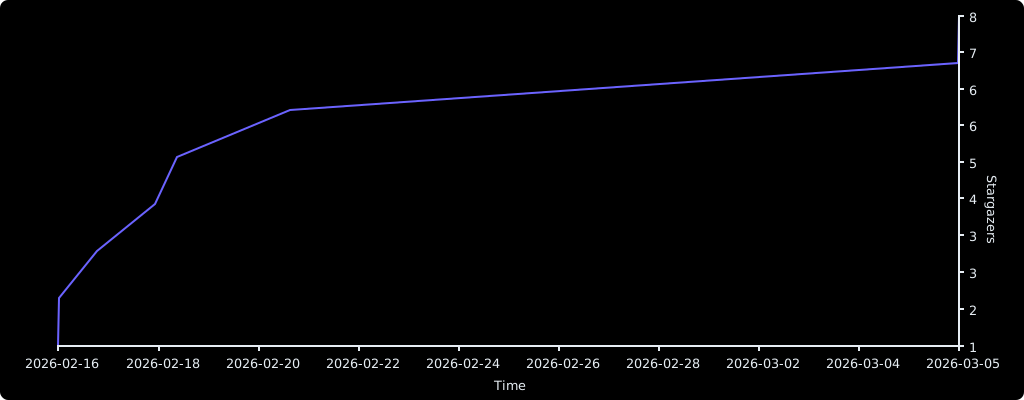
Stargazers over time
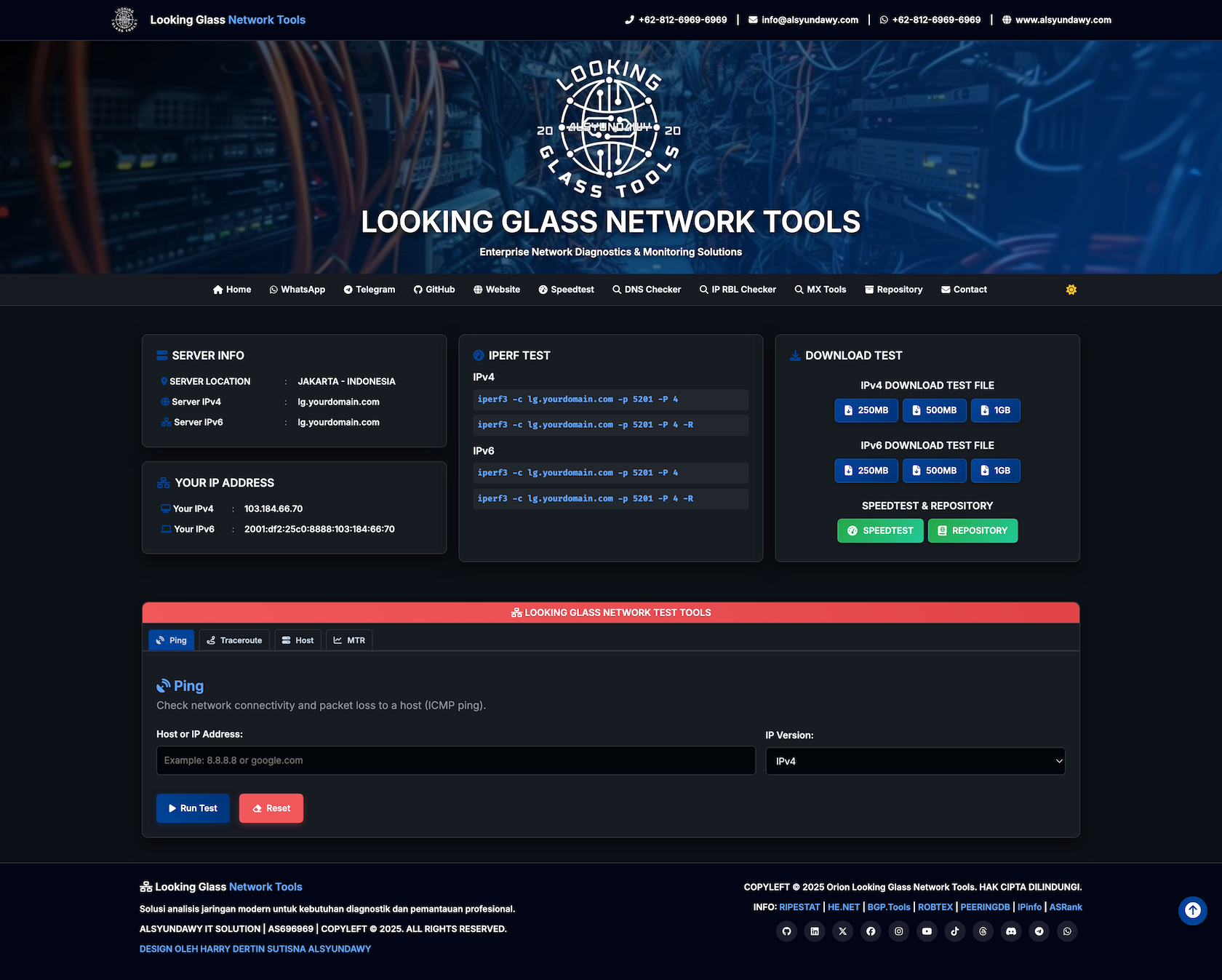
A professional, lightweight, single-file PHP Looking Glass tool designed for network diagnostics. Fully compatible with IPv4 and IPv6, featuring a modern, responsive UI (Dark/Light mode) and utilizing standard system utilities.
Features
- Network Diagnostics: Ping, Traceroute, MTR (My Traceroute), and Host (DNS Lookup).
- Performance Testing:
- Iperf3: TCP, UDP, and Reverse mode support.
- Download Tests: Customizable binary file downloads.
- Modern UI:
- Fully responsive design (Mobile to 4K).
- Dark/Light mode toggle.
- Real-time client IP detection.
- Security: Strict input sanitization to prevent command injection.
- Easy Deployment: Single PHP file, no database required.
Requirements
- PHP: Version 8.1 or higher.
- PHP Modules:
php-cli,php-common,php-fpm(if using Nginx),php-json,php-mbstring,php-xml. - Web Server: Nginx or Apache.
- System Utilities: The web server user must be able to execute the following commands:
pingtraceroutemtriperf3host(usually part ofbind-utilsordnsutils)
Installation Guide
1. Install System Dependencies through Terminal
Debian/Ubuntu:
sudo apt-get update
sudo apt-get install php-cli php-fpm php-json php-common php-mbstring php-xml ping traceroute mtr-tiny iperf3 dnsutils -y
CentOS/RHEL/AlmaLinux:
sudo dnf install php-cli php-fpm php-json php-common php-mbstring php-xml iputils traceroute mtr iperf3 bind-utils -y
2. Deployment
Simply download ALSYUNDAWY-LG-GITHUB-2026.php rename to index.php and upload it to your web server’s public directory (e.g., /var/www/html/lg/).
3. Web Server Configuration
To ensure optimal performance, security, and functionality (especially for large downloads and long-running tests like MTR), please use the following configurations.
Option A: Nginx + PHP-FPM
Create a new server block or modify your existing one. This configuration includes Gzip compression, Extended Timeouts, Security Headers, and IPv6 support.
server {
    # Listen on port 80 for both IPv4 and IPv6
    listen 80;
    listen [::]:80;

    server_name lg.yourdomain.com;
    root /var/www/html/lg;
    index index.php;

    # =========================================================================
    # PERFORMANCE & TIMEOUTS
    # =========================================================================
    # Allow large file uploads/downloads (Critical for Speedtest/Download Test)
    client_max_body_size 4096M;

    # Extended timeouts for long-running processes (MTR, Traceroute)
    client_header_timeout 86400;
    client_body_timeout 86400;
    fastcgi_read_timeout 86400;
    proxy_read_timeout 86400;

    # =========================================================================
    # SECURITY HEADERS & SETTINGS
    # =========================================================================
    server_tokens off;      # Hide Nginx version
    autoindex off;          # Disable directory listing
    http2 on;               # Enable HTTP/2 for better performance

    # Security headers
    add_header Vary Accept-Encoding;
    proxy_hide_header Vary;

    # =========================================================================
    # CUSTOM ERROR PAGES
    # =========================================================================
    error_page 400 /400.html;
    error_page 401 /401.html;
    error_page 402 /402.html;
    error_page 403 /403.html;
    error_page 404 /404.html;
    error_page 500 /500.html;
    error_page 502 /502.html;
    error_page 503 /503.html;

    # =========================================================================
    # GZIP COMPRESSION
    # =========================================================================
    gzip on;
    gzip_static on;
    gzip_disable "MSIE [1-6]\.(?!.*SV1)";
    gzip_http_version 1.1;
    gzip_min_length 1100;
    gzip_vary on;
    gzip_comp_level 7;
    gzip_proxied any;
    gzip_buffers 128 4k;
    gzip_types
        text/css
        text/javascript
        text/plain
        text/xml
        application/x-javascript
        application/javascript
        application/json
        application/vnd.ms-fontobject
        application/x-font-opentype
        application/x-font-truetype
        application/x-font-ttf
        application/xml
        application/font-woff
        application/atom+xml
        application/rss+xml
        application/x-web-app-manifest+json
        application/xhtml+xml
        font/eot
        font/opentype
        font/otf
        image/svg+xml
        image/vnd.microsoft.icon
        image/bmp
        image/png
        image/gif
        image/jpeg
        image/jpg
        image/webp
        image/x-icon
        text/x-component;

    # =========================================================================
    # LOCATION BLOCKS
    # =========================================================================
    location / {
        try_files $uri $uri/ =404;
    }

    location ~ \.php$ {
        include snippets/fastcgi-php.conf;
        # Adjust the socket path to match your PHP version (e.g., php8.1-fpm.sock)
        fastcgi_pass unix:/run/php/php8.1-fpm.sock;
        fastcgi_param SCRIPT_FILENAME $document_root$fastcgi_script_name;
        include fastcgi_params;
    }

    # Deny access to hidden files (e.g., .htaccess, .git)
    location ~ /\.ht {
        deny all;
    }
}
Option B: Apache + PHP
Ensure mod_rewrite, mod_deflate, mod_headers, and mod_http2 are enabled.
<VirtualHost *:80>
    ServerName lg.yourdomain.com
    DocumentRoot /var/www/html/lg

    # =========================================================================
    # PROTOCOLS & SECURITY
    # =========================================================================
    # Enable HTTP/2 (Requires mod_http2)
    Protocols h2 http/1.1

    # Hide Apache version and signature
    ServerTokens Prod
    ServerSignature Off

    # =========================================================================
    # PERFORMANCE & TIMEOUTS
    # =========================================================================
    # Allow large uploads/downloads (4096M = 4294967296 bytes)
    LimitRequestBody 4294967296

    # Extended timeouts for long-running tests (MTR/Traceroute)
    # TimeOut directive in Apache (seconds)
    TimeOut 86400

    <Directory /var/www/html/lg>
        Options -Indexes +FollowSymLinks
        AllowOverride All
        Require all granted
    </Directory>

    # =========================================================================
    # CUSTOM ERROR PAGES
    # =========================================================================
    ErrorDocument 400 /400.html
    ErrorDocument 401 /401.html
    ErrorDocument 402 /402.html
    ErrorDocument 403 /403.html
    ErrorDocument 404 /404.html
    ErrorDocument 500 /500.html
    ErrorDocument 502 /502.html
    ErrorDocument 503 /503.html

    # =========================================================================
    # HEADERS
    # =========================================================================
    <IfModule mod_headers.c>
        Header append Vary Accept-Encoding
    </IfModule>

    # =========================================================================
    # GZIP COMPRESSION (mod_deflate)
    # =========================================================================
    <IfModule mod_deflate.c>
        AddOutputFilterByType DEFLATE text/css text/javascript text/plain text/xml
        AddOutputFilterByType DEFLATE application/x-javascript application/javascript application/json
        AddOutputFilterByType DEFLATE application/vnd.ms-fontobject application/x-font-opentype application/x-font-truetype
        AddOutputFilterByType DEFLATE application/x-font-ttf application/xml application/font-woff
        AddOutputFilterByType DEFLATE application/atom+xml application/rss+xml application/x-web-app-manifest+json application/xhtml+xml
        AddOutputFilterByType DEFLATE font/eot font/opentype font/otf
        AddOutputFilterByType DEFLATE image/svg+xml image/vnd.microsoft.icon image/bmp image/x-icon
    </IfModule>
</VirtualHost>
4. SSL Installation (Certbot)
Secure your Looking Glass with HTTPS using Let’s Encrypt.
Install Certbot:
Debian/Ubuntu:
sudo apt-get install certbot python3-certbot-nginx python3-certbot-apache -y
CentOS/RHEL:
sudo dnf install certbot python3-certbot-nginx python3-certbot-apache -y
Run Certbot:
For Nginx:
sudo certbot --nginx -d lg.yourdomain.com
For Apache:
sudo certbot --apache -d lg.yourdomain.com
Follow the on-screen instructions to automatically configure SSL.
5. PHP Configuration (php.ini)
Ensure the following functions are NOT disabled in your php.ini file (disable_functions directive):
proc_openproc_get_statusproc_closestream_get_contents
Example:
disable_functions = passthru,shell_exec,system,popen,parse_ini_file,show_source
; removed proc_open, proc_close, etc. from the list
6. PHP Performance Tweaking
To ensure smooth operation of network tests (especially defined download sizes and long traceroutes), add or modify these lines in your php.ini or FPM pool configuration:
; Increase execution time for long tests (MTR/Traceroute)
max_execution_time = 300
max_input_time = 300

; Ensure sufficient memory for large data handling
memory_limit = 256M

; Disable output buffering for real-time results (optional but recommended)
output_buffering = Off
zlib.output_compression = Off
Service Configuration (Iperf3)
To keep the Iperf3 server running in the background as a service, creates a systemd unit file.
-
Create the service file:
sudo nano /etc/systemd/system/iperf3.service -
Add the following content:
[Unit] Description=Iperf3 Server Service After=network.target [Service] Type=simple User=nobody ExecStart=/usr/bin/iperf3 -s -p 5201 Restart=always RestartSec=3 [Install] WantedBy=multi-user.target -
Start and enable the service:
 sudo systemctl daemon-reload
 sudo systemctl start iperf3
 sudo systemctl enable iperf3
Firewall Configuration
You need to allow traffic on ports 80 (HTTP), 443 (HTTPS), and 5201 (Iperf3).
Option A: UFW (Ubuntu/Debian)
sudo ufw allow 80/tcp
sudo ufw allow 443/tcp
sudo ufw allow 5201/tcp
sudo ufw reload
Option B: Firewalld (CentOS/RHEL/AlmaLinux)
sudo firewall-cmd --permanent --add-service=http
sudo firewall-cmd --permanent --add-service=https
sudo firewall-cmd --permanent --add-port=5201/tcp
sudo firewall-cmd --reload
Option C: Iptables
sudo iptables -A INPUT -p tcp --dport 80 -j ACCEPT
sudo iptables -A INPUT -p tcp --dport 443 -j ACCEPT
sudo iptables -A INPUT -p tcp --dport 5201 -j ACCEPT
sudo service iptables save
Configuration
Open index.php in a text editor and customize the following sections to match your server and organization details.
1. Main Configuration (Required)
Find the // Hardcoded Looking Glass Tools Configuration section near the top of the file (~line 184) and update the values:
// Hardcoded Looking Glass Tools Configuration
$ipv4 = 'lg.yourdomain.com';              // Your server IPv4 address or hostname
$ipv6 = 'lg.yourdomain.com';              // Your server IPv6 address or hostname (leave empty '' if not available)
$siteName = 'LOOKING GLASS NETWORK TOOLS'; // Your site/company name
$siteUrl = 'https://lg.yourdomain.com';    // Your Looking Glass URL
$siteUrlv4 = 'https://lg.yourdomain.com';  // IPv4-specific URL for download tests
$siteUrlv6 = 'https://lg.yourdomain.com';  // IPv6-specific URL for download tests
$serverLocation = 'JAKARTA - INDONESIA';   // Your server location

// Iperf Port
$iperfport = '5201';                       // Iperf3 port (default: 5201)

// Test files
$testFiles = array('250MB', '500MB', '1GB'); // Download test file sizes (files must exist in same directory)
2. Header Contact Information
Find the <header class="header"> section (~line 641) and update the contact details:
| Item | What to change |
|---|---|
| Phone number | +62-812-6969-6969 (appears in desktop and mobile header) |
| Email address | info@alsyundawy.com (mailto link) |
| WhatsApp number | 6281269696969 in wa.me/ link |
| Website URL | https://www.alsyundawy.com |
3. Navigation Links
Find the <nav class="main-nav"> section (~line 680) and update the links:
| Item | What to change |
|---|---|
| WhatsApp link | https://wa.me/62-812-6969-6969 |
| Telegram link | https://t.me/alsyundawy |
| GitHub link | https://github.com/alsyundawy |
| Website link | https://www.alsyundawy.com |
| Contact email | mailto:info@alsyundawy.com |
4. JSON-LD Structured Data (SEO)
Find the JSON-LD via json_encode() section (~line 440) and update the organization data:
| Item | What to change |
|---|---|
| Organization name | ALSYUNDAWY IT SOLUTION (appears in $appSchema, $websiteSchema, $orgSchema) |
| Organization URL | https://alsyundawy.com |
| Phone number | +62-812-6969-6969 |
| NOC email | noc@alsyundawy.com |
| Abuse email | abuse@alsyundawy.com |
| AS Number | AS696969 and 696969 (appears in PeeringDB, BGP.tools URLs and identifier) |
| Street address | Full postal address in $orgSchema |
| Logo URL | https://alsyundawy.com/logo.png |
5. Footer
Find the <footer class="site-footer"> section (~line 989) and update:
| Item | What to change |
|---|---|
| Company name | ALSYUNDAWY IT SOLUTION |
| AS Number | AS696969 (in copyright text and info links) |
| Designer credit | HARRY DERTIN SUTISNA ALSYUNDAWY |
| Info links | RIPESTAT, HE.NET, BGP.Tools, ROBTEX, PEERINGDB, IPinfo, ASRank URLs (replace 696969 with your ASN) |
6. Social Media Links
Find the <div class="social-links"> section in the footer (~line 1013) and update all social media URLs:
| Platform | URL to change |
|---|---|
| GitHub | https://github.com/alsyundawy |
https://linkedin.com/alsyundawy |
|
| Twitter/X | https://twitter.com/alsyundawy |
https://facebook.com/alsyundawy |
|
https://instagram.com/harry.ds.alsyundawy |
|
| YouTube | https://youtube.com/alsyundawy |
| TikTok | https://tiktok.com/alsyundawy |
| Threads | https://threads.net/alsyundawy |
| Discord | https://discord.gg/alsyundawy |
| Telegram | https://telegram.org/alsyundawy |
https://wa.me/+62-812-6969-6969 |
Image & Logo Customization
You can customize the logo and background image by replacing the following files in the same directory as the script:
- Logo:
lg-logo.webp(Recommended height: ~36px) - Background:
hero-lg.webp(Background for the header, recommended compressed webp format)
Ensure these files are accessible by the web server user.
Creating Dummy Files for Download Test
You can generate dummy files for the download speed test using the dd command in the terminal. Navigate to your web server’s directory (e.g., /var/www/html/lg/) and run:
250MB File:
dd if=/dev/zero of=250MB.bin bs=1M count=250 status=progress
500MB File:
dd if=/dev/zero of=500MB.bin bs=1M count=500 status=progress
1GB File:
dd if=/dev/zero of=1GB.bin bs=1M count=1024 status=progress
Note: Ensure the filenames match the values in your
$testFilesconfiguration array in the PHP script.
Troubleshooting
1. 404 Not Found
- Nginx: Ensure the
try_filesdirective is present in your location block. - Apache: Ensure
mod_rewriteis enabled and.htaccesssupport is active (AllowOverride All).
2. 500 Internal Server Error
- Check web server error logs (
/var/log/nginx/error.logor/var/log/apache2/error.log). - Ensure all required PHP extensions are installed.
- Check permissions: The web server user (
www-dataorapache) must have read access to the script.
3. “Command not found” or Empty Output
- Verify that
ping,traceroute,mtr, etc., are installed (which ping). - Check
php.inito ensureproc_openandproc_get_statusare NOT indisable_functions.
4. Iperf3 Connection Refused
- Ensure Iperf3 service is running:
sudo systemctl status iperf3. - Check firewall settings to confirm port 5201 is open.
- Verify the server IP in the PHP configuration matches your actual public IP.
Changelog
v1.0.3 - 2026-03-05
- Fixed undefined
$script_namevariable; now uses$_SERVER['SCRIPT_NAME']. - Fixed incorrect
date()format from'YY-mm-dd'to'Y-m-d'(ISO 8601). - Fixed missing
https://scheme oncdnjs.cloudflare.compreconnect tag. - Fixed JavaScript syntax error: invalid jQuery selector
$((html,body)). - Increased
fread()buffer from 8192 to 16384 for faster streaming output. - Removed duplicate changelog entry and blank lines in doc comment.
- Code review and optimization pass.
v1.0.2 - 2026-02-18
- Updated hero background in light mode to match dark mode style.
- Updated
lg-logo.webpandhero-lg.webp. - Optimize CSS and JS Minify.
v1.0.1 - 2026-02-17
- Implemented Session Validity Check (CSRF Token) on POST requests.
- Added bilingual error handling (ID/EN) for timed-out sessions.
- Enhancements and optimization image webp.
- Security enhancements and optimization.
v1.0.0 - 2026-02-16
- Initial Release.
- Full Looking Glass functionality with optimized 3-column layout.
- Integrated Iperf3 and Download Test features.
Donation
Anda bebas untuk mengubah, mendistribusikan script ini untuk keperluan anda.
If you find this project helpful and would like to support it, please consider donating via https://www.paypal.me/alsyundawy. Thank you for your support!
Jika Anda merasa terbantu dan ingin mendukung proyek ini, pertimbangkan untuk berdonasi melalui https://www.paypal.me/alsyundawy. Terima kasih atas dukungannya!
Jika Anda merasa terbantu dan ingin mendukung proyek ini, pertimbangkan untuk berdonasi melalui QRIS. Terima kasih atas dukungannya!
License
MIT License - Copyright (c) 2026 Alsyundawy IT Solution